
Active Directory Security Best Practices
QUICK ANSWER
Active Directory is the identity backbone of most enterprises — and the primary target in most ransomware attacks. Securing it means enforcing least privilege, tiering administrative access, auditing every change in real time, protecting privileged accounts and Group Policy, and maintaining a tested ability to recover the AD forest quickly after an attack.
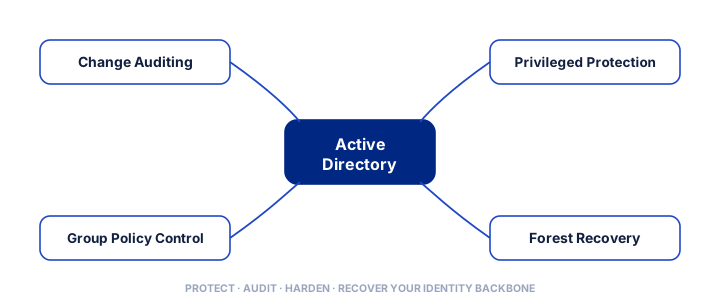
Because Active Directory (AD) controls access to nearly everything, it is the first thing attackers try to seize. These best practices help you harden AD against compromise and, just as importantly, recover if the worst happens.
1. Enforce Least Privilege
Grant users and administrators only the access they genuinely need, and review it regularly.
Over-permissioned accounts and unused privileges are exactly what attackers exploit to escalate. Reducing standing privilege shrinks the attack surface dramatically.
2. Tier Your Administrative Access
Separate administrative accounts by tier so that credentials used to manage workstations cannot also administer domain controllers. This “tiered admin” model stops an attacker who compromises a low-level admin from pivoting straight to full domain control — one of the most effective structural defences for AD.
3. Protect Privileged Accounts
Domain and enterprise admin accounts are the crown jewels. Limit their number, require multi-factor authentication, avoid using them for daily work, and manage them with Privileged Access Management (PAM) so their credentials are vaulted and their sessions monitored.
4. Audit Every Change in Real Time
Native logging gives limited visibility into who changed what in AD. Deploy real-time change auditing so risky changes — new privileged accounts, permission changes, Group Policy edits — are detected and alerted as they happen, not discovered weeks later during an investigation.
5. Keep Group Policy Clean and Controlled
Group Policy is powerful and frequently abused.
Manage GPO changes with approval workflows and version control so misconfigurations and malicious edits can be caught and rolled back. Regularly review GPOs for drift and unnecessary permissions.
6. Harden and Reduce Attack Paths
Disable legacy protocols where possible, remove stale accounts and unused trusts, and regularly assess AD for the misconfigurations and attack paths that tools and attackers alike look for. Treat AD hygiene as an ongoing programme, not a one-off project.
7. Maintain Tested AD Recovery
Assume the worst can happen. When ransomware hits, domain controllers are often among the first casualties — and without AD, nothing else can be restored.
Maintain automated backup and a tested forest-recovery capability so you can bring AD back to a clean state quickly. Untested recovery is not recovery.
Why These Practices Work Together
No single measure secures Active Directory on its own — their power is cumulative. Least privilege and tiered administration shrink what an attacker can reach; privileged-account protection and real-time auditing make abuse hard and quickly visible; Group Policy control and hardening remove the misconfigurations attackers exploit; and tested recovery ensures that even a successful attack is survivable.
Treated as an ongoing programme rather than a one-off checklist, these practices turn AD from your biggest liability into a defensible, recoverable asset.
Tools and Local Support
These practices are far easier to enforce with the right tooling. WASS Technologies deploys Quest solutions for AD change auditing, Group Policy control and rapid forest recovery, and Symantec and Quest for privileged-access protection — with Egypt-based engineers to help Egyptian enterprises assess and harden their directory.
Active Directory Benchmark
95 Million Daily Attacks: Microsoft Active Directory systems experience over 95 million targeted credential and authentication attacks daily, with 90% of global enterprises utilizing AD as their core identity backbone (Microsoft Security Intelligence).
8. Continuously Assess Attack Paths
Beyond individual controls, look at how they combine.
Attackers chain small weaknesses — an over-permissioned account here, a cached credential there, a risky trust relationship — into a path from an ordinary user to domain admin. Regularly assessing Active Directory for these attack paths reveals the specific, highest-impact fixes, so you harden what actually matters most rather than everything at once.
Treat this as an ongoing exercise: environments change, new paths appear, what was secure last quarter may not be today. Combined with the practices above, continuous attack-path assessment keeps your directory defensible as it evolves — and gives you a clear, prioritised list of what to fix next.
Frequently Asked Questions (FAQs)
Why do attackers target Active Directory? AD controls authentication and access for nearly every system; compromising it lets attackers move anywhere and deploy ransomware widely.
What is the single most important AD security step? Two stand out: tightly controlling and monitoring privileged accounts, and having a tested, automated AD forest-recovery capability.
How often should Active Directory be audited? Continuously — real-time change auditing detects suspicious activity as it happens, complemented by periodic privileged-account and GPO reviews.
Learn more: Active Directory Security · Privileged Access Management · Identity & Access Management
Harden Your Active Directory
Ask our team across Egypt for an Active Directory security and recoverability review — we assess your privileged access, auditing and forest-recovery readiness and help you close the gaps.
Talk to our team across Egypt